How 'Sign in with Google' Actually Works Under the Hood
Learn how OAuth 2.0 Sign in with Google works: authorization codes, redirect URIs, token exchange, PKCE, state, and token theft risks.
Why this matters: Sharing Passwords With Every App
You want to let users sign in to your app with their Google account. The naive approach: ask for their Google username and password, then call the Gmail API on their behalf. This is catastrophically insecure — you’re storing plaintext Google credentials, the user can’t revoke your access without changing their password, and a breach of your database compromises every user’s Google account.
Before OAuth, this was actually how it worked. Third-party apps collected usernames and passwords directly. The user had no way to limit what the app could do — you gave it full access to everything. And revoking access meant changing your password, which broke every other app using those same credentials.
OAuth 2.0 solves this by introducing an authorization layer between the user, your application, and the resource server (Google). The user never gives your app their password. Instead, they authenticate directly with Google, consent to specific permissions (scopes), and Google issues your app a time-limited access token with only the granted scopes.
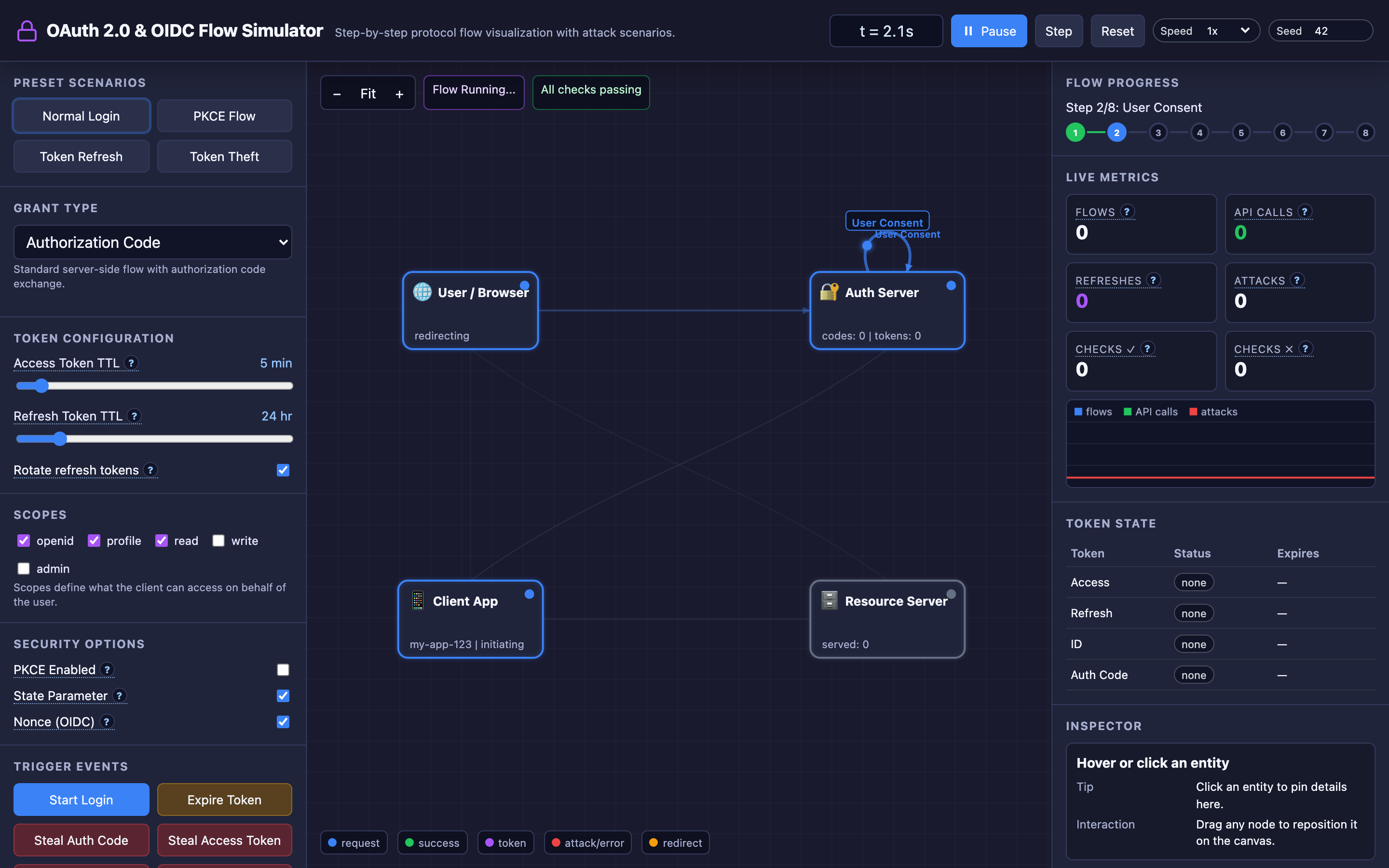
The interactive demo models four entities — User/Browser, Client Application, Authorization Server, and Resource Server — and animates the exact messages at each stage with arrows showing the flow.
Practical note OAuth security depends on boring exactness: exact redirect URIs, random state, PKCE, short-lived tokens, and scopes that do not ask for more than needed.
The mental model: The Authorization Code Flow Step-by-Step
The Authorization Code flow is the most secure and widely used OAuth 2.0 grant type. It involves five stages, each animated in the interactive demo:
Stage 1: Authorization Request. Your app redirects the user’s browser to Google’s authorization endpoint with parameters: client_id, redirect_uri, response_type=code, scope=openid profile email, state=random_csrf_token, and optionally nonce for OIDC replay protection.
GET https://accounts.google.com/o/oauth2/v2/auth?
  client_id=YOUR_CLIENT_ID
  &redirect_uri=https://yourapp.com/callback
  &response_type=code
  &scope=openid%20profile%20email
  &state=a1b2c3d4e5f6  # CSRF protection
  &nonce=xyz789          # Replay protection
Stage 2: User Consent. Google shows the user a consent screen listing the requested scopes. The user approves. Google generates a short-lived authorization code (valid for 60 seconds, single-use).
Stage 3: Code Redirect. Google redirects the user’s browser back to your redirect_uri with the authorization code and state parameter: https://yourapp.com/callback?code=AUTH_CODE_HERE&state=a1b2c3d4e5f6.
Stage 4: Token Exchange. Your server-side application sends the authorization code to Google’s token endpoint along with your client_secret. This happens server-to-server — the client secret never touches the browser.
Google validates the code and returns an access token (short TTL, 1–60 minutes in the interactive demo), a refresh token (long TTL, 1–168 hours), and optionally an ID token (JWT with user info).
Stage 5: API Calls. Your app includes the access token as a Bearer token in API requests: Authorization: Bearer ACCESS_TOKEN. When the access token expires, the refresh token is used to get a new one without requiring user interaction. The interactive demo’s “Token Refresh” preset configures a 1-minute access token TTL to demonstrate this cycle.
Hint The interactive demo lets you switch between all four grant types and toggle security parameters independently. Try the “Token Refresh” preset with a 1-minute access token
TTLto watch the refresh flow in action.
Decisions that matter
-
Grant Type (Authorization Code / Auth Code + PKCE / Implicit / Client Credentials): Authorization Code is the default for server-side apps. PKCE extends it for public clients (mobile apps, SPAs) that can’t securely store a
client_secret. Implicit is deprecated — it exposes the access token in the URL fragment. Client Credentials is for machine-to-machine communication. The interactive demo lets you switch between all four and see how the message flow changes. -
Access Token TTL (1–60 minutes): Short TTLs (1–5 minutes) limit the damage from token theft but force frequent refresh flows. Long TTLs (30–60 minutes) reduce refresh overhead but mean a stolen token is valid for up to an hour. The interactive demo’s token
TTLslider lets you experiment with this tradeoff and trigger the “Expire Token” button to see the refresh flow. -
Refresh Token TTL (1–168 hours): Controls how long a user stays “signed in” without re-authenticating. At 1 hour, users re-authenticate frequently — annoying but more secure. At 168 hours (7 days), the session persists for a week, but a stolen refresh token provides extended access. Refresh token rotation (issuing a new refresh token with each use and revoking the old one) limits the attack window.
-
Scopes (
openid,profile,read,write,admin): Define what the token can access. Request minimum necessary scopes — an app that only needs to read a user’s name shouldn’t requestadminscope. The interactive demo lets you toggle scopes independently and see how they appear in the consent screen. -
Security Parameters (PKCE,
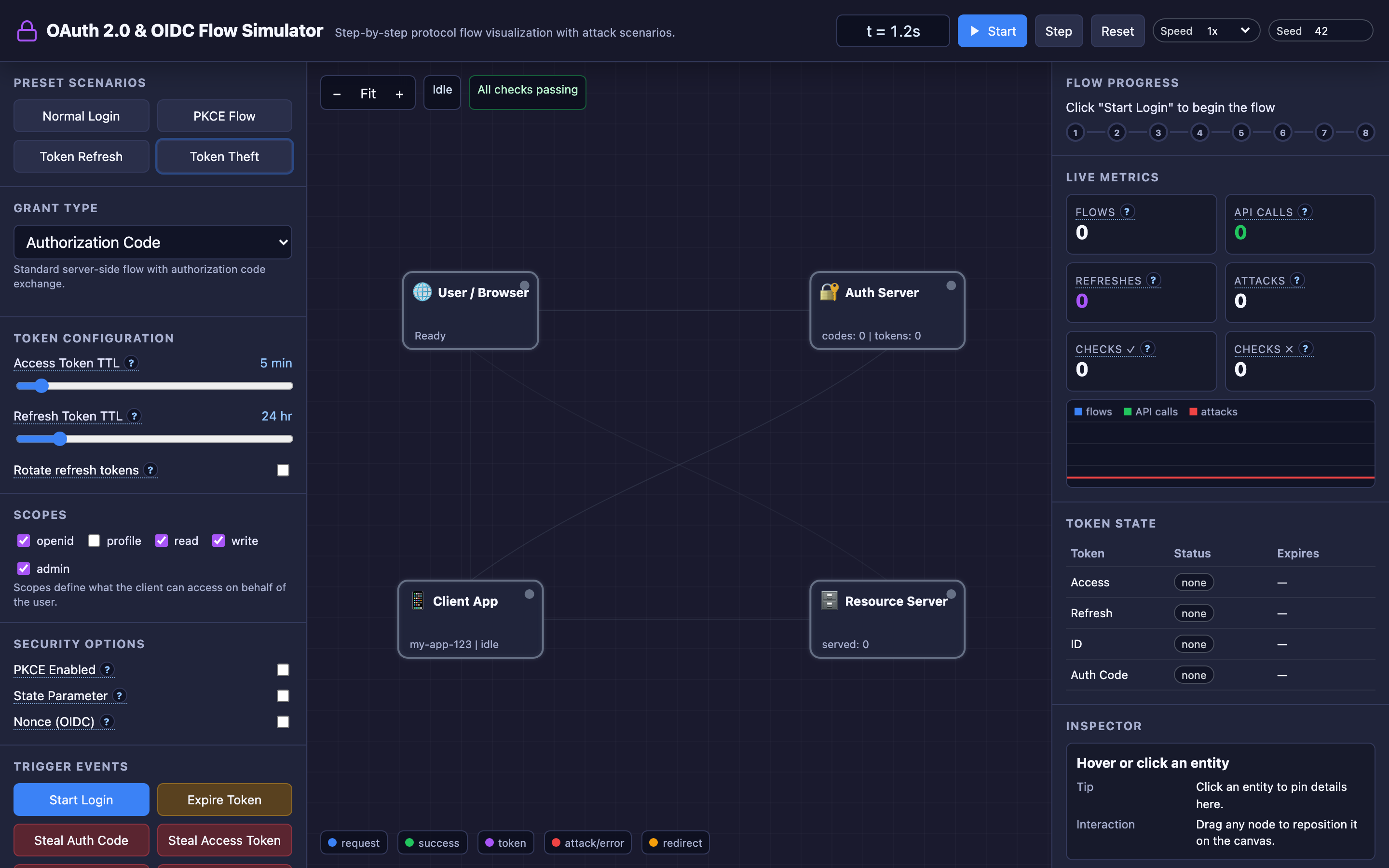
state,nonce): Each can be toggled independently in the interactive demo. Disablingstateenables CSRF attacks. Disabling PKCE enables authorization code interception. Disablingnonceenables ID token replay attacks. The “Token Theft” preset disables all three to demonstrate attack scenarios.
Where it breaks: Redirect URI Manipulation
The failure mode: Your OAuth client registration allows wildcard redirect URIs like https://yourapp.com/*. An attacker crafts a malicious authorization URL that sets redirect_uri=https://yourapp.com/evil-page.
The user authenticates with Google normally, grants consent, and Google redirects the browser to https://yourapp.com/evil-page?code=AUTH_CODE. If /evil-page contains attacker-controlled JavaScript (via an XSS vulnerability), the authorization code is exfiltrated. The attacker exchanges the code for an access token using the intercepted code.
What you will notice: Your authorization server logs show token exchange requests with unfamiliar redirect URIs. User session tokens appear in third-party referrer logs.
Security audit reveals the OAuth client is registered with a broad redirect URI pattern. The interactive demo’s “Redirect URI Manipulation” attack button demonstrates this — watch the authorization code get intercepted and sent to an attacker-controlled endpoint.
# WRONG: Wildcard redirect URI registration
registered_redirect_uris = [
    "https://yourapp.com/*"        # Allows ANY path
]

# CORRECT: Exact redirect URI registration
registered_redirect_uris = [
    "https://yourapp.com/callback"  # Exact match only
]
What I would do: Register exact redirect URIs — no wildcards, no patterns. The authorization server must reject any request where the redirect_uri doesn’t exactly match a registered value.
For development, register http://localhost:3000/callback separately. Audit your OAuth client registrations quarterly. The interactive demo demonstrates how strict redirect URI validation blocks this attack.
Warning Wildcard redirect URI patterns are one of the most common OAuth misconfigurations. A single XSS vulnerability on any page of your domain becomes a full authorization code theft vector.
Where it breaks: CSRF State Parameter Omission
The failure mode: Your OAuth implementation doesn’t include a state parameter in the authorization request. An attacker authenticates with their own account, captures the callback URL containing their authorization code (https://yourapp.com/callback?code=ATTACKER_CODE), and tricks the victim into clicking this link (via email, chat, or a hidden iframe).
The victim’s browser sends the request to your app, which exchanges the attacker’s code for an attacker’s token and links the attacker’s Google account to the victim’s session. The victim is now unknowingly logged in as the attacker — any data they enter (credit cards, addresses) goes into the attacker’s account.
What you will notice: Users report seeing unfamiliar account data after clicking links. Support tickets mention “someone else’s profile showing up.”
Your logs show token exchange requests where the session cookie and the authorization code belong to different users. The interactive demo’s “CSRF Attack” button demonstrates this flow — watch the attacker’s code get used in the victim’s session.
# WRONG: No state parameter
redirect_url = f"{AUTH_ENDPOINT}?client_id={CLIENT_ID}&redirect_uri={REDIRECT_URI}&response_type=code"

# CORRECT: Cryptographic state parameter
import secrets
state = secrets.token_urlsafe(32)
session['oauth_state'] = state
redirect_url = f"{AUTH_ENDPOINT}?client_id={CLIENT_ID}&redirect_uri={REDIRECT_URI}&response_type=code&state={state}"

# On callback:
if request.args['state'] != session.pop('oauth_state'):
    abort(403, "CSRF detected: state mismatch")
What I would do: Always include a cryptographically random state parameter. Generate it server-side, store it in the user’s session, include it in the authorization request, and verify it on the callback.
The state must be unpredictable (use secrets.token_urlsafe(32), not sequential integers), tied to the user’s session, and single-use. Both state (CSRF protection) and nonce (replay protection) should be enabled — the interactive demo lets you toggle each independently to see what breaks.
Where it breaks: Token Endpoint Exposure in Implicit Flow
The failure mode: Your SPA uses the Implicit flow (deprecated) because “it’s simpler — no server-side token exchange needed.” The access token is returned directly in the URL fragment: https://yourapp.com/#access_token=eyJhbGci...&token_type=Bearer.
The token appears in browser history, can be leaked through the Referer header to third-party resources on the page, and is visible in browser developer tools. A browser extension or compromised analytics script on the page reads window.location.hash and exfiltrates the token. The attacker now has full API access until the token expires.
What you will notice: Your API logs show API calls from unfamiliar IP addresses using valid tokens. The token’s associated user reports activity they didn’t perform.
Browser-side JavaScript error tracking shows third-party scripts accessing location.hash. Your security scan detects access tokens in URL fragments in web server logs.
// WRONG: Implicit flow — token in URL fragment
// The user's browser now has: /#access_token=eyJhbGci...
// Any script on the page can read this:
const token = new URLSearchParams(window.location.hash.substring(1)).get('access_token');

// CORRECT: Use Authorization Code + PKCE for SPAs
// Generate code verifier and challenge
const codeVerifier = generateRandomString(128);
const codeChallenge = await sha256(codeVerifier);
// Token exchange happens via POST, never in URL
What I would do: Never use Implicit flow. Use Authorization Code + PKCE for all public clients (SPAs, mobile apps). PKCE adds a code_verifier and code_challenge pair: the client generates a random verifier, sends its SHA-256 hash as the challenge in the authorization request, and proves possession of the original verifier during token exchange.
Even if an attacker intercepts the authorization code, they can’t exchange it without the code_verifier. The interactive demo’s PKCE preset shows this flow with the additional code_verifier/code_challenge steps animated.
Hint Use the interactive demo’s “Token Theft” preset to see all three attack scenarios in sequence. Then enable PKCE,
state, andnonceone at a time to watch each defense mechanism block its corresponding attack.
The tradeoff
| Approach | Pros | Cons |
|---|---|---|
| Authorization Code | Most secure, tokens never in browser, server-side client secret | Requires server-side component for token exchange |
| Authorization Code + PKCE | Secure for SPAs and mobile, no client secret needed | Slightly more complex, requires code_verifier management |
| Implicit (deprecated) | Simple, no server needed | Token in URL, no refresh tokens, vulnerable to interception |
| Client Credentials | Simple M2M auth, no user interaction | No user context, only for service-to-service |
| Short access token TTL (5 min) | Minimal damage from token theft | Frequent refresh flows, higher latency |
| Long access token TTL (60 min) | Fewer refreshes, better UX | Stolen token valid for up to 1 hour |
| Refresh token rotation | Limits attack window on stolen refresh tokens | More complex token management, revocation logic |
| No refresh token rotation | Simpler implementation | Stolen refresh token provides indefinite access |
A practical checklist
Step 1: Identify which grant type you’re using. Check your authorization request URL for response_type. If it’s token, you’re using Implicit — migrate to code with PKCE immediately. If it’s code, verify that PKCE is enabled for public clients.
# Check your OAuth configuration
grep -r "response_type" src/auth/
# If you see response_type=token, migrate to code+PKCE
Step 2: Verify state and nonce are implemented. Search your codebase for the authorization redirect. Confirm a random state parameter is generated, stored in the session, and validated on callback. Same for nonce if you’re using OIDC. Missing either one is a critical vulnerability.
Step 3: Audit redirect URI registrations. Log into your OAuth provider’s developer console (Google Cloud Console, Auth0 Dashboard, Okta Admin). Check that redirect URIs are exact matches — no wildcards, no localhost in production.
Step 4: Implement token rotation. Enable refresh token rotation in your authorization server configuration. When a refresh token is used, the old one should be revoked immediately. Detect reuse of revoked refresh tokens as a token theft signal and invalidate the entire token family.
Step 5: Monitor token usage patterns. Log the IP address and user agent on every API call. Alert when a single access token is used from multiple IP addresses or geographic regions simultaneously — this indicates token theft. The interactive demo demonstrates how stolen tokens are used from attacker-controlled endpoints.
Try it yourself
The interactive demo models four entities with animated arrows showing every message exchange. Choose from four grant types, toggle security parameters independently, and use attack buttons — Steal Auth Code, Steal Access Token, CSRF Attack, Redirect URI Manipulation — to see how each vulnerability works. The “Token Theft” preset disables PKCE, state, and nonce so you can explore every attack path.
Try the interactive OAuth 2.0 Flow demo — step through authorization code exchanges, trigger CSRF attacks, steal tokens, and see why PKCE and state parameters are non-negotiable.